
BluEclipse
☰
BluEclipse
BluEclipse desktop tools
Point it at a folder of photographs and it scores every frame for sharpness, files the keepers separately from the soft ones, and leaves a report explaining each decision. The interesting part is the algorithm we had to abandon to get there.
Photo-Focus is a small Windows application that does one unglamorous job properly: it looks at every image in a folder, decides whether it is in focus, and moves it accordingly.
Anyone who shoots in volume knows the task it replaces. A session produces hundreds of frames. Some meaningful fraction of them are soft — focus landed on the ear instead of the eye, the shutter was a stop too slow, the subject moved at the wrong moment. None of that is visible in a thumbnail grid. Finding it means opening each frame, zooming to a hundred percent, and looking.
It is slow, and worse, it degrades. Judgement at frame six hundred is not the judgement applied at frame twenty. The same photograph can be kept in the morning and discarded in the evening, which means the standard being applied is not really a standard at all.
A machine has the opposite problem. It has no taste whatsoever, but it is perfectly consistent. Photo-Focus was built to take the mechanical half of the culling job — is this frame technically sharp — and do it the same way every time, leaving the half that actually requires a photographer.
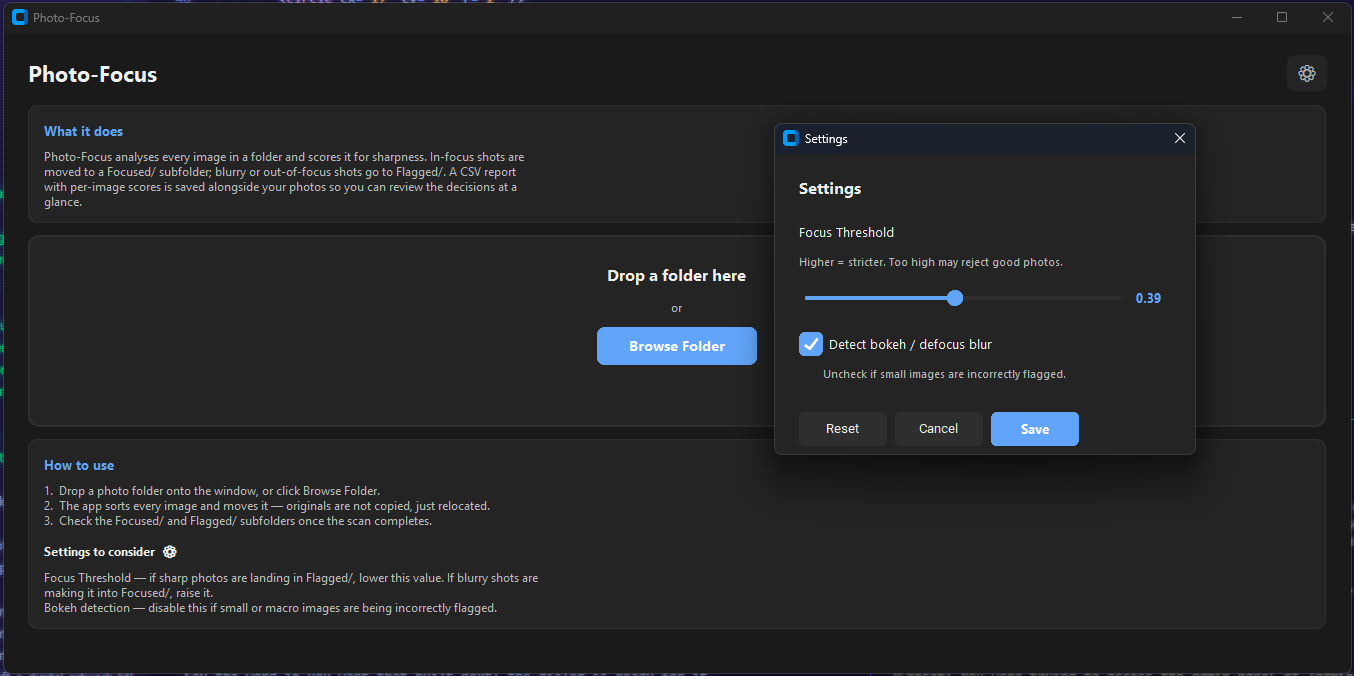
There is no project to create, no library to import, no catalogue to maintain. You drag a folder onto the window, or click Browse Folder, and the run begins immediately.
Focused/ or Flagged/ inside the folder you chose.The EXIF step matters more than it sounds. A portrait-orientation frame stored as a landscape image with a rotation flag will be analysed along the wrong axis unless the flag is honoured first. Any directional measurement made without applying it is measuring the sensor, not the photograph.
The downscale is a speed decision with a pleasant side effect. Sharpness is a property of the image, not of its pixel count, and evaluating a forty-megapixel frame at full resolution mostly measures how long you are prepared to wait.
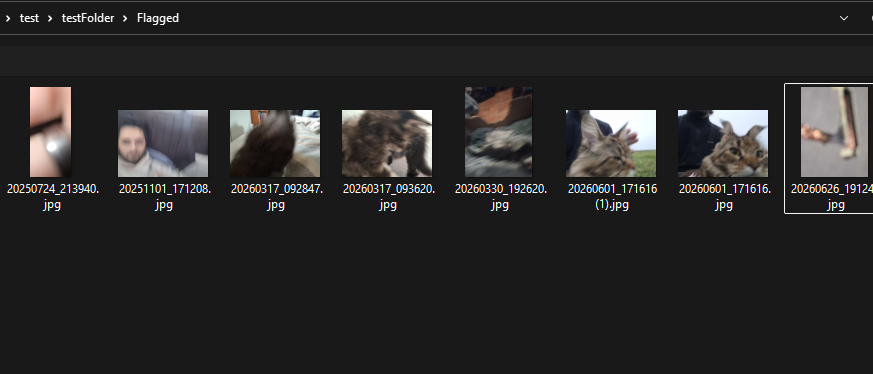
Files are moved, never copied and never deleted. A run rearranges your folder; it does not duplicate it, and it does not destroy anything.
Moves resolve collisions rather than overwriting: if a file of the same name already sits in the destination, the incoming one becomes name-1.jpg, then name-2.jpg, and so on. It is a small piece of code, and it is the difference between a tool you trust with an afternoon of shooting and one you do not.
The scan runs on a background thread and reports progress back to the interface as it goes, so the window keeps painting and the count keeps climbing through a folder of any size.
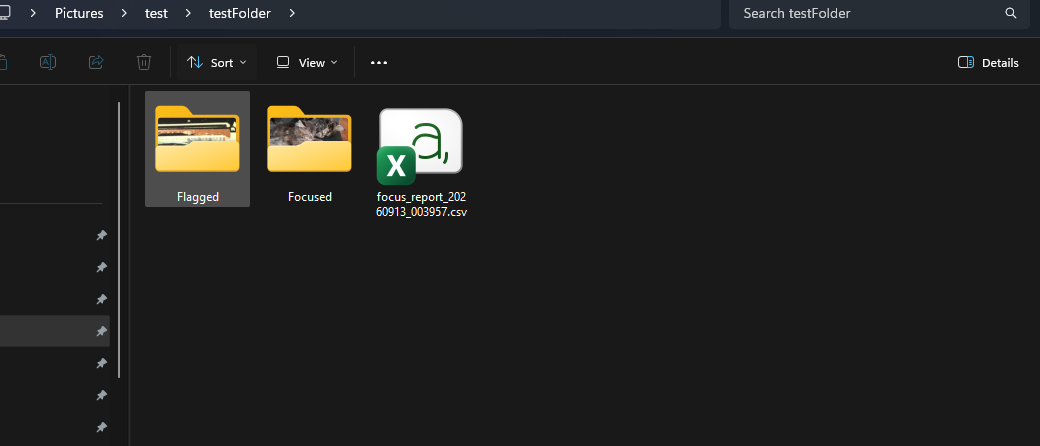
Photo-Focus did not start with a variance measure. It started with a published idea that is considerably more interesting, and the honest version of this article has to include the part where that idea was abandoned.
The method builds a local frequency picture along a chosen direction. For a given angle, you sample the image along a short one-dimensional window, compute a discrete Pseudo-Wigner Distribution across that window, and take its Rényi entropy. Do this for six equally spaced directions — 0°, 30°, 60°, 90°, 120° and 150° — and you get six entropy figures describing how much structure the image carries in each direction.
The insight is what you do with those six numbers. You do not care about their magnitude; you care about how much they disagree. A sharp photograph is directionally lumpy: edges, textures and detail run in particular directions, so entropy varies noticeably from angle to angle. Blur is a smoothing operation, and smoothing washes that directional character out. The spread of the six values — their anisotropy — becomes the focus score.
It is a genuinely elegant formulation, and it has a property a simple gradient measure lacks: it describes the character of the detail rather than merely its quantity.
We implemented it twice. Once faithfully to the paper, sampling rotated windows position by position. Once as a much faster proxy using a bank of oriented Gabor filters to approximate the same directional response in a fraction of the time.
Neither survived contact with real photographs. The scores it produced did not order images the way a person would; frames that were obviously soft scored above frames that were obviously sharp. The comment left in the module that replaced it is blunter than anything we would write for a client, and accurate: the method is theoretically sound, and our implementation of it produced unreliable scores.
That distinction is worth sitting with. The failure may well have been ours rather than the paper's. But a tool that sorts a photographer's work cannot ship on the strength of a promising idea it has not made work. Both implementations are still in the source tree, reachable by a configuration flag, because a negative result you can still run is worth keeping. The default path does not go near them.
What replaced it is the oldest trick in the file: Laplacian variance. Apply a Laplacian kernel, which responds to rapid changes in brightness, and take the variance of the result. Sharp images have abrupt transitions and a wide spread of responses. Blurred images have gentle ones and a narrow spread.
Raw variance spans several orders of magnitude, so it is mapped onto a usable scale logarithmically. A very blurry frame lands near zero, a moderately detailed one near the middle, and a crisply detailed one in the upper range, all clipped into 0 to 1 so that a single human-readable threshold means something.
This metric is well understood, fast, and reliable in the ordinary case. It is also famously easy to fool, and everything interesting in Photo-Focus is the machinery built to stop it being fooled.
A panned or shaken frame can retain a surprisingly high variance — the smear itself has contrast. What it does not have is edges. So the score is cross-examined with a Canny edge-density pass, and a frame claiming to be sharp while producing almost no detectable edges has its score cut substantially. High energy with nothing to show for it is the signature of a smear.
Out-of-focus highlights are the awkward case. Bokeh discs have crisp, high-contrast rims, and to a variance measure a field of them looks like a field of detail. The distinguishing feature is repetition: real detail varies locally in complicated ways, while bokeh repeats the same soft circular pattern. Photo-Focus tests for that by measuring how much local texture actually varies across the frame, and penalises suspiciously high scores that come with suspiciously uniform texture.
This is the subtlest of the three. Push the ISO far enough and a photograph fills with random per-pixel variation — which is, by any variance measure, an enormous amount of high-frequency content. A grainy frame of nothing can score like a crisp frame of something.
Separating the two requires asking not how much gradient there is, but whether the gradients agree. Real edges are coherent: neighbouring pixels along a contour push in the same direction. Noise is incoherent by definition, pointing everywhere at once. Photo-Focus computes a structure tensor over the image, smooths it, and compares its eigenvalues to produce a coherence value — high where gradients align, low where they are random — weighted by gradient magnitude so that flat sky does not get a vote. Combined with a robust noise estimate, an image that is loud but incoherent is heavily penalised, and one that is merely a little noisy is nudged down rather than dismissed.
The shipped algorithm is not clever. It is a simple measure with three specific, well-understood failure modes, and a deliberate correction for each one.
Every heuristic above produces a number. Where the line falls on that number is not a technical question, and pretending otherwise would have been the easiest way to make this tool useless.
A wildlife photographer working at the edge of a long lens accepts softness that a studio product shoot never would. A frame that is unusable at A2 is perfectly fine at thumbnail size. So the threshold is a slider, running from lenient to strict, sitting in a settings panel with the guidance written next to it: if sharp photos are landing in Flagged, lower it; if soft ones are reaching Focused, raise it.
Bokeh detection gets its own checkbox for a more specific reason. It is the one correction with a known false-positive mode — small and macro images can trip it — and rather than bury that in a support document, the app says so directly on the settings panel and lets the pass be turned off.
This is the part that tends to get skipped. A tool that quietly moves several hundred of someone else's files has to be legible. If it makes a decision you disagree with, you need to be able to see that it did, understand roughly why, and change the outcome without guessing.
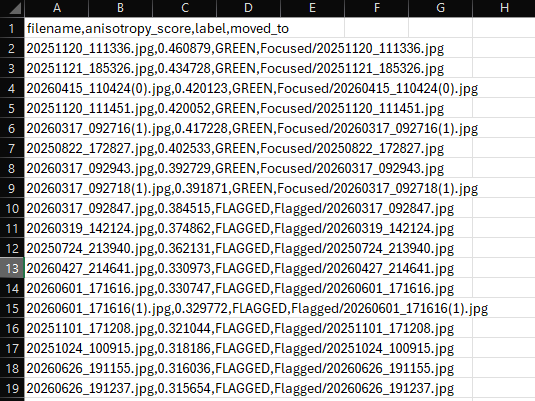
The CSV report is the other half of that. It is not a log file; it is the audit trail. Every frame appears with its score, its label and its destination, ordered sharpest first — which means the borderline cases cluster together right at the threshold, in the one region worth reviewing by hand. If a run is not sorting the way you want, the report tells you exactly where to put the slider.
| Detail | Value |
|---|---|
| Sharpness metric | Laplacian variance, log-scaled to a 0-1 range |
| Default threshold | 0.39, adjustable from 0.20 to 0.60 |
| Correction passes | Edge density, bokeh detection, gradient coherence, noise level |
| Working resolution | Downscaled to 3000 px wide, aspect preserved |
| Supported formats | JPG, PNG, TIFF, BMP, WebP |
| Typical speed | 1-3 seconds per image |
| Runtime | Python 3.13, OpenCV, NumPy, Pillow, CustomTkinter |
| Distribution | Standalone Windows executable, no Python installation |
| Network access | None. Everything runs on the local machine |
Photo-Focus ships as a single Windows executable with its Python runtime bundled inside. Nothing to install, no interpreter to manage, no account to create.
It also never touches the network. That was not a feature request; it is simply the right shape for the job. Photographs are frequently commercially sensitive and occasionally personal, and there is no reason a sharpness check should be an upload. The images stay on the machine that took them.
photo-focus-settings-and-report.webp
Two panels: the Settings dialog with its threshold slider and bokeh checkbox, beside the generated CSV report opened in a spreadsheet showing filenames, scores and labels sorted by score.
Photo-Focus is not a large piece of software. It is one window, a scoring routine and a file mover. But the shape of the work is the same as the shape of every other project we take on.
We started from the most sophisticated approach available, implemented it twice, tested it against reality, and found that it did not do the job. Discarding it cost real work. Keeping it would have cost a photographer their photographs.
What replaced it was a simpler method whose weaknesses are documented and specifically corrected, with the subjective decisions handed back to the person who owns the files and a report explaining every choice the software made on its own.
That is the whole method: prefer the approach that demonstrably works over the approach that should work, be explicit about where it fails, and never make an irreversible decision on the user's behalf without showing your reasoning.
Photo-Focus is a BluEclipse Technologies tool.
If culling is eating your editing time, or you need this adapted to your own workflow, formats or storage, we can talk about it.
Image processing, desktop applications, and turning a research method into something that holds up on real data — that is the kind of work this represents.
photo-focus-final-banner.webp
Full-bleed banner: the Photo-Focus and BluEclipse identities together over a restrained contact sheet of photographs, some marked focused and some flagged.